LLMNR+NBT NS Linux
- initial enum done
- found a few hosts, lab_adm user, enumerated hosts, naming schemes
- next: NETWORK POISONING and PASSWORD SPRAYING
- This is to get a foothold with cleartext creds on a domain user
- Gather creds and gain foothold:
- a Man-in-the-Middle attack on Link-Local Multicast Name Resolution (LLMNR) and NetBIOS Name Service (NBT-NS) broadcasts
LLMNR and NBT-NS
- these services are used as alternate methods of host identification when DNS resolution fails.
- When DNS fails, the machine will try to ask other machines on the network for the correct host address via LLMNR
- If LLMNR fails, NBT-NS is used.
- NBT-NS identifies systems on a local network using their NetBIOS name
- LLMNR -
PORT 5355 (UDP)| NBT-NS -PORT 137 (UDP)
HOW THIS WORKS?
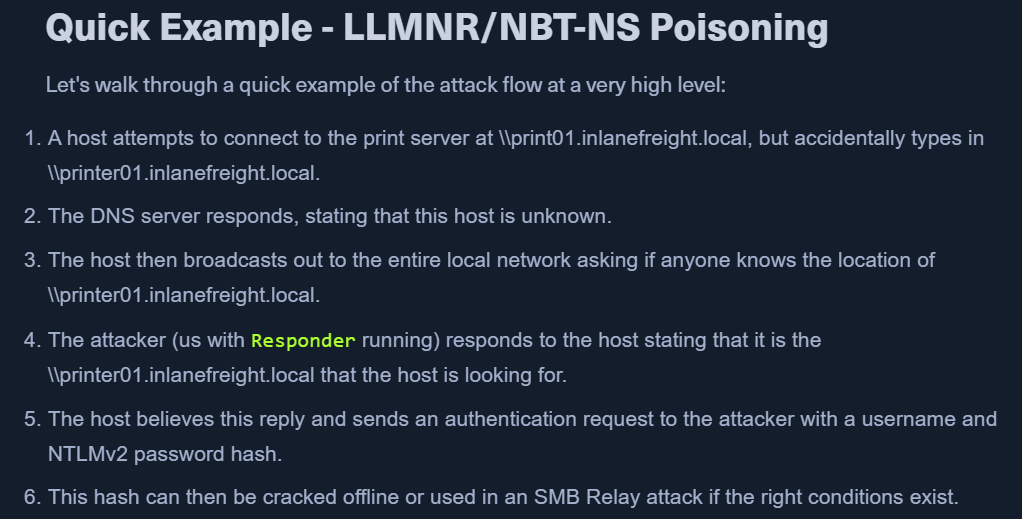
- When target requests for name resolution of some address X and DNS fails, LLMNR is used.
- all the machines in the network can answer to this query.
- Here, we start responder and show that we know the answer (IP) of X to the target.
- This responder poisoning will get the victim to communicate with us.
- If name resolution and authentication is required, we will see a NetNTLM hash which we can crack offline.
- This auth request can also be relayed to access another host or use with another protocol (LDAP) on the same host.
TTP
- use responder to capture the hashes
TOOLS: 1. Responder - https://github.com/lgandx/Responder - MOSTLY LINUX 1. Responder is a purpose-built tool to poison LLMNR, NBT-NS, and MDNS, with many different functions. 2. Inveigh - https://github.com/Kevin-Robertson/Inveigh - MOSTLY WINDOWS 2. Inveigh is a cross-platform MITM platform that can be used for spoofing and poisoning attacks. 3. Metasploit 2. Metasploit has several built-in scanners and spoofing modules made to deal with poisoning attacks.
PROTOCOLS to attack using the above tools: - LLMNR - DNS - MDNS - NBNS - DHCP - ICMP - HTTP - HTTPS - SMB - LDAP - WebDAV - Proxy Auth Responder also has support for: - MSSQL - DCE-RPC - FTP, POP3, IMAP, and SMTP auth
Responder
- Written in Python
- Initial Enum section had Responder tool in Analysis (passive) mode.
- It was listening but not answering with poisoned responses.
- It was listening but not answering with poisoned responses.
- RUN THE TOOL AS SUDO - UDP packets are involved
responder -h-w: start a WPAD rogue server-wflag utilizes the built-in WPAD proxy server. This can be highly effective, especially in large organizations, because it will capture all HTTP requests by any users that launch Internet Explorer if the browser has Auto-detect settings enabled.
-f: fingerprint the host-v: verbose-F / -P: force NTLM or Basic auth. may prompt a dialogue box.- use cautiously
- [*] Skipping previously captured hash
- If you wish to keep seeing the hashes for same user add the
-voption. python responder.py -I eth0 -wrfv
- If you wish to keep seeing the hashes for same user add the
- Responder will print it out on screen and write it to a log file per host located in the
/usr/share/responder/logsdirectory. - Hashes are saved in the format
(MODULE_NAME)-(HASH_TYPE)-(CLIENT_IP).txt - Any of the rogue servers (i.e., SMB) can be disabled in the
Responder.conffile. - Once we get a hash from responder.
- Use
hashcat -m 5600 example.hash /opt/SecLists/Passwords/Leaked-Databases/rockyou.txt - https://hashcat.net/wiki/doku.php?id=example_hashes
- Use