FTP - 21
- TCP Port 21
- upload local files to a server and download other files
- Command List
- clear text protocol
anonymous FTP can be enabled
TFTP:
- Trivial FTP
- no authentication or other features
- File transfer via UDP
- No Directory Listing here

Default Configuration:
- Most used FTP server:
vsFTPdfound in/etc/vsftpd.conf - Checking config:

- another file that denies users access to FTP:

- Dangerous Settings:

- The usage of
anonymoususer can be done in internal environments, or when all users of the application are known
Commands:
statusdebugtracels -R- List all the files recursivelyget <filename>- Download a file from the FTP serverwget -m --no-passive ftp://anonymous:anonymous@10.129.14.136- Download all available files from the FTP server-
put filename- Upload a file to the FTP Server\ -
If the FTP server is running with SSL/TLS, we can use openssl to connect to the ftp server.
openssl s_client -connect 10.129.14.136:21 -starttls ftp- This will also display the certificate information *
\ - 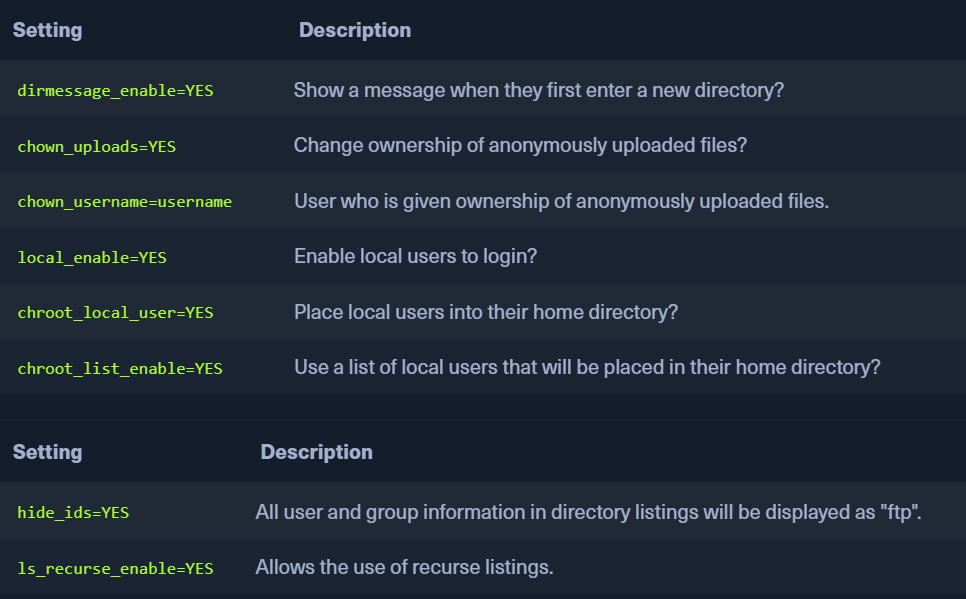 - `Hide IDs` - feature is important to hide the name of user that owns a file. - This will stop us from knowing usernames and trying brute force attacks on the systems. - `Fail2Ban` - Intrusion Prevention Python script used by systems to monitor the log files and block