- Port FWDing allows us to redirect a commx request from one port to another
- Uses a TCP layer primarily
- SOCKS - Socket Secure
- Internet protocol that exchanges network packets between a client and a server through a proxy server
- SOCKS server proxies TCP connections to an arbitrary IP and provides means to fwd UDP packets
- SOCKS5 allows authentication
- Effective in bypassing firewalls and using existing services on the compromised host to pivot to other networks
Setting up to Pivot
Scenario
- We do not have any port running on localhost
- But now, the Ubuntu server is connected to another (internal) network that is not accessible via our PWNBox
- To scan a range of IPs of the internal network via out PWNBox, we need to perform dynamic port forwarding and pivot out network packets via the Ubuntu server.
How? - SSH tunneling over SOCKS proxy
- Start a SOCKS listener on the pwnbox and configure SSH to forward the traffic via SSH to the internal network after connecting to the pivot
- firewall evasion - allow an external entity to bypass the firewall and access a service within the firewalled environment.
- SOCKS client initiates connection with the SOCKS server (pwnbox) who wants to access a service on the client-side
- Once the connection is established, network traffic can be routed thru the SOCKS server on behalf of the connected client.
- SOCKS proxies can pivot via creating a route to an external server from NAT networks.
- 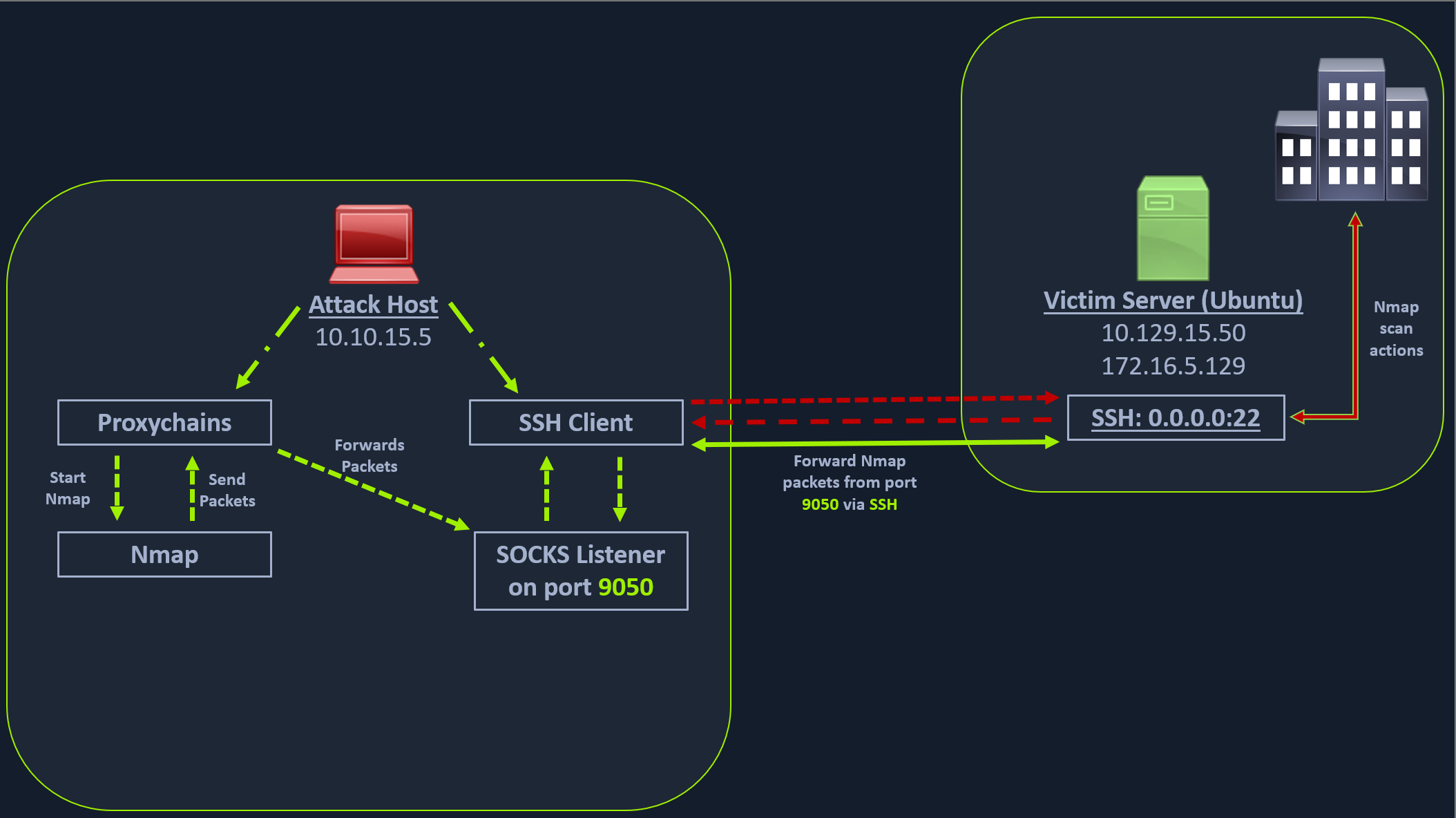 - the attack host starts the SSH client and requests the SSH server to allow it to send some TCP data over the ssh socket.
- The SSH server responds with an acknowledgment,
- the SSH client then starts listening on
- the attack host starts the SSH client and requests the SSH server to allow it to send some TCP data over the ssh socket.
- The SSH server responds with an acknowledgment,
- the SSH client then starts listening on localhost:9050.
- Whatever data you send here will be broadcasted to the entire network (172.16.5.0/23) over SSH.
Workflow:
Enable Dynamic port forwarding with SSH
- ssh -N -D 9050 ubuntu@10.129.202.64
- -D - request the SSH server (ubuntu) to enable dynamic port forwarding
- -N - no shell session is started
Route any packets over the port 9050
- using proxychains
- hide the origin IP and only show pivots IP
- Proxychains is often used to force an application's TCP traffic to go through hosted proxies like SOCKS4/SOCKS5, TOR, or HTTP/HTTPS proxies.
- Modify the /etc/proxychains4.conf file to add socks4 127.0.0.1 9050
- Will tell proxychains to send all traffic to port 9050
- Commands
- proxychains nmap -v -sn 172.16.5.1-200
- SOCKS tunneling - packs all NMap data using proxychains and forwards it to a remote server
-  - A full TCP connect scan without ping on an entire network range will take a long time.
Enum the Windows target through Proxychains
proxychains nmap -v -Pn -sT 172.16.5.19- EG: we have
PORT 3389open - RDP
Metasploit via Proxychains
proxychains msfconsolemsf6 > search rdp_scanner
xfreerdp with Proxychains
proxychains xfreerdp /v:172.16.5.19 /u:victor /p:pass@123
Local mhanje remote port aplya local port var yenar.