Skip to content

101

  • AD is a directory service for Windows Network envs
  • Distributed, hierarchical, allows centralized management of an orgs resources.
    • resources - users, computers, groups, network devices, file shares, group policies, devices, trusts.
  • Backward-compatible + many features are not "SECURE BY DEFAULT"
  • AD is a sizeable read-only DB accessible to all users within that domain, regardless of their privilege
  • A basic AD user account can enumerate most objects within an AD
  • AD provides authentication and authorization functions within a Windows domain environment.
  • AD DS (ACTIVE DIRECTORY DOMAIN SERVICES) - allow orgs to store directory data and make it available to both standard users and admins.
    • stores information such as usernames and passwords and manages the rights needed for authorized users to access this information.
  • AD has a hierarchical tree structure with a forest (domain) on top containing one or more domains
    • these domains can have subdomains
    • The contained objects in the domain structure are accessible
  • A forest is the security boundary within which all objects are under administrative control.
  • Many built-in Org Units (OUs) - Domain Controller, Users, Computers.
    • New OUs can be created as required.
  • It can be common to see multiple domains linked together by trust relationships

Terminology

  • Object
    • any resource present in the AD env
  • Attributes
    • Information about the objects
  • Schema
    • blueprint of an AD env
    • an object is an instance of a class
      • computer MS01 will be an instance of the Computer class
  • Domain
    • logical group of objects like comps, users, OUs, printers
    • domains can operate independently of each other
  • Tree
    • collection of AD domains that begins at a single root domains.
    • A forest is a collection of trees
    • 2 trees in a same forest cannot share the namespace
  • Forest
    • collection of AD domains
    • topmost container and contains all AD objects
  • Container
    • objects hold other objects and have a defined place in the directory subtree hierarchy
  • Leaf
    • end of the subtree
  • Global Unique Id (GUID)
    • unique 128 bit value assigned when a domain user or group is created.
    • unique across the enterprise
    • every single object has this GUID - ObjectGUID attribute
    • AD uses to id objects internally
    • does not change as long as the object exists
  • Security Principals
    • anything that the OS can authenticate
      • Users, comps
  • Security Identifier (SID)
    • unique ID for security principal or security group
    • an SID is used only once within that AD environment, to id an user, group, process, even if the security principal is deleted
    • Well-known SIDs - https://ldapwiki.com/wiki/Wiki.jsp?page=Well-known%20Security%20Identifiers
    • When a user logs in - sys creates an access token for the user with its SID, the rights granted, SIDs for any group that the user is a member of.
    • SID token is used to check rights while performing an action
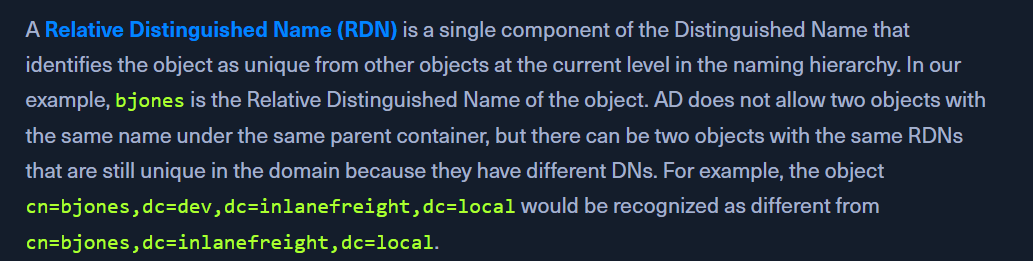
  • Distinguished Name (DN)
  • Relative Distinguished Name (RDN)
  • sAMAccountName
    • user's logon name.
    • bjones in the above case
  • userPrincipalName
    • id users in an AD
    • bjones@inlanefrieght.local
  • FSMO Roles
    • Flexible Single Master Operation
  • Global Catalog
    • domain controller that stores copies of objects of all AD forest
    • performs auth
    • allows object search within the forest
  • Read-Only Domain Controller
    • read-only AD DB
  • Replication
    • transfer from one DC to another
  • Service Principal Name (SPN)
    • uniquely id a service instance
  • Group Policy Object (GPO)
    • collect policy settings
  • Access Control Lists (ACLs)
    • collection of ACEntries that apply to an object
  • ACE
    • maps a trustee(user, comp) to its access rights
  • Discretionary Access Control (DACL)
    • define which security principals are granter or denied access to an object
    • list of ACEs
    • If no DACL - full access
    • If no ACE in the DACL - no access
  • System Access Control Lists (SACL)
    • log access attempts to secured objects
  • Fully Qualified Domain Name
    • [hostname].[domain name].[tld]
    • eg: DC01.inlanefrieght.local
    • can use fqdn instead of an IP in the AD
  • Tombstone
    • container object that holds deleted objects
    • deleted obj stays for a tombstone lifetime
    • attributes lost cannot be recovered
  • AD Recycle Bin
  • SYSVOL
    • public files - system policies, group policy settings,s cripts
  • AdminSDHolder
    • manage ACLs for privileged built-in groups
    • SDProp (SD Propagator) process runs every hour to check hte ACLs on protected groups
  • dsHeuristics
    • define multiple forest-wide configs
    • If a group is excluded via the dsHeuristics attribute, then any changes that affect it will not be reverted when the SDProp process runs.
  • admin Count
    • if 1, user is protected
    • if 0, not protected
      • from the SDProp process
    • target the user set to 1
  • Active Directory Users and Computers (ADUC)
    • ADUC is a GUI console commonly used for managing users, groups, computers, and contacts in AD.
    • Changes made in ADUC can be done via PowerShell as well.
  • sIDHistory
    • holds SIDs than an object had previously
    • used in migrations
  • NTDS.DIT
    • Stored on an AD at C:\Windows\NTDS
    • Important for POST-EXPLOITATION
    • If the setting Store password with reversible encryption is enabled, then the NTDS.DIT will also store the cleartext passwords for all users created or who changed their password after this policy was set.
  • MSBROWSE
    • provide browsing services
    • In older version of Windows we could use nbtstat -A ip-address to search for the Master Browser. If we see MSBROWSE it means that's the Master Browser. Aditionally we could use nltest utility to query a Windows Master Browser for the names of the Domain Controllers.
    • obsolete now