Passwd, Shadow, Opasswd
- Linux distros can use many authentication mechanisms
- Most common is
PAM(Pluggable Authentication module) - Modules
pam_unix.soorpam_unix2.soand are located in/usr/lib/x86_x64-linux-gnu/security/in Debian based distributions pam_unix.somodule updates the passwd and shadow file- PAM also has other service modules like - LDAP , mount, kerberos
passwd File
If we have write permissions to the /etc/ directory, we can edit the /etc/passwd file to remove the x password field for root to login as root without a password
shadow file
- If the password field contains a character, such as
!or*, the user cannot log in with a Unix password. But, other authentication methods for logging in, such as Kerberos or key-based authentication, can still be used. - If the field is empty, no password is required to login
- This might lead to specific programs denying access to functions.
- hence, add an easy passwd
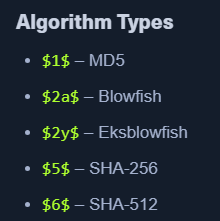
- By Default - SHA 512
$6$is uesd
- By Default - SHA 512
Opasswd
pam_unix.socan prevent reuse of old passwords- old passwords are stored at
/etc/security/opasswd - requires root access
- We can see the passwords are separated by a comma
- These are MD5 hashed
$1$and easy to crack - We might get a pattern
Cracking Linux Creds
- Unshadow
sudo cp /etc/passwd /tmp/passwd.baksudo cp /etc/shadow /tmp/shadow.bakunshadow /tmp/passwd.bak /tmp/shadow.bak > /tmp/unshadowed.hashes
- Hashcat - Unshadowed hashes
hashcat -m 1800 -a 0 /tmp/unshadowed.hashes rockyou.txt -o /tmp/unshadowed.cracked
- Hashcat - MD5 hashes
hashcat -m 500 -a 0 md5-hashes.list rockyou.txt
Random Notes:
kira:L0vey0u1!